Tutorial 02: Backtest Validation
Overview
| Item | Description |
|---|---|
| Goal | Read backtest output and risk metrics; identify overfitting, look-ahead bias, and data issues |
| Estimated time | 60–90 minutes |
| Prerequisites | Tutorial 00, Tutorial 01; see Report Format Guide for the full metric table |
Deep dive into backtest results, interpret reports and charts, and determine whether a strategy is truly effective.
Further reading: FAQ (blank HTML, JSON field troubleshooting, etc.).
Table of Contents
- What Is a Backtest?
- What a Backtest Tells You
- 2.1 Report Examples in the Repository (
reports/) - 2.2 How Do Different Strategies' Backtest Reports Look?
- Interpreting the Backtest Report
- Interpreting Charts
- Risk and Attribution Analysis
- Determining Whether a Strategy Is Effective
- Common Backtesting Pitfalls
- Portfolio Backtesting
- Next Steps
1. What Is a Backtest?
Backtesting is "replaying" your trading strategy against historical data to see what would have happened if you had actually traded according to the strategy at the time.
Your strategy rules
     +
Historical market data
     ↓
Backtest engine → Simulated trades → Trade log + Portfolio equity curve
What a Backtest Does
- Validate ideas: Does the strategy you think works actually make money?
- Discover flaws: Are there edge cases you haven't considered?
- Parameter selection: Which parameter combination is more reasonable?
- Build confidence: Get a quantitative assessment before risking real capital
What a Backtest Cannot Tell You
- Guaranteed future profits: Historical performance does not equal future returns
- Exact profit amounts: Backtests have various biases (slippage, liquidity, etc.)
- Universal effectiveness: A strategy that works in a bull market may fail in a bear market
2. What a Backtest Tells You
After running a backtest, you'll get a set of core metrics:
| Metric | Meaning | Benchmark |
|---|---|---|
| Total Return | Total profit/loss percentage over the backtest period | Beating the benchmark (CSI 300) is good |
| Annualized Return | Return annualized to a per-year rate | > 10% is acceptable, > 20% is excellent |
| Annualized Volatility | Magnitude of return fluctuations | Lower is better (< 25% preferred) |
| Sharpe Ratio | Excess return per unit of risk taken | > 1 is good, > 2 is excellent |
| Max Drawdown | Largest peak-to-trough decline | Smaller is better (< 15% preferred) |
| Sortino Ratio | Like Sharpe, but only considers downside volatility | > 1 is good |
| Alpha | Excess return over the benchmark | Positive is good |
| Beta | Sensitivity to the broad market | Close to 1 = tracks the market |
| Win Rate | May refer to "daily win rate" or "trade win rate" in the HTML, which have different meanings | See below and Report Format Guide |
Note:
analyze_returnsreturnswin_rate_daily(percentage of profitable trading days) andwin_rate_trade(percentage of profitable round-trip trades). You cannot directly compare these two numbers to judge strategy quality.
2.1 Report Examples in the Repository (reports/)
A real backtest writes four sets of files (.html / .png / .md / .json) under the repository root's reports/ directory. Filenames include timestamps; those with suffixes (e.g., _19_localdata) typically correspond to a report_suffix or script description in the example scripts.
Recommended reading: The repository's reports/README.md lists a mapping table for the example scripts. The HTML screenshot below and backtest_20260511_234245_19_localdata.html are from the same run (example 06_local_data.py); a copy is placed in assets/tutorials/ for easy display on the web — when studying locally, open the corresponding .html file in your browser alongside the Report Format Guide.
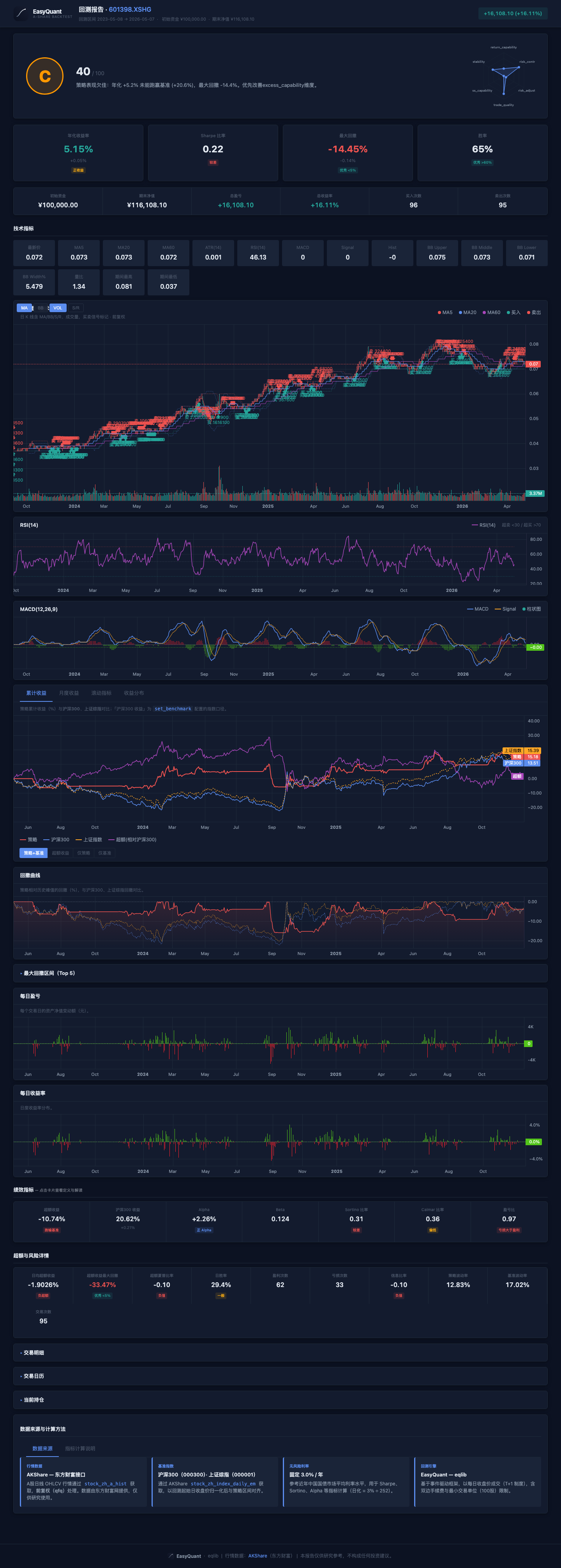
You can also open from the same result set:
../reports/backtest_20260511_234245_19_localdata.html(under the repo root'sreports/, interactive report; the cumulative return and drawdown charts include both CSI 300 and SSE Composite dual benchmarks)- If you haven't generated it yet: run
python examples/06_local_data.pyin the repo root, then find the latest*_19_localdata.*inreports/.
The abstract "strategy vs benchmark" line chart is still available at: ../assets/tutorials/sample_equity_vs_benchmark.svg.
Cross-referencing the HTML header and metric card readings: After opening the .html file mentioned above, follow Report Format Guide Section 2.8 to cross-reference each item (same source as the HTML screenshot above); if the chart area is blank, it's likely due to CDN blocking — see the FAQ.
2.2 How Do Different Strategies' Backtest Reports Look?
Within the same framework, reports from different strategies have the same structure but different numbers. Below are 6 completed examples: open each script's corresponding .html to see identical page layouts with vastly different metric card values.
Note: The numbers below are from specific backtest periods and stock selections. Results will vary significantly depending on market conditions, time period, and stock selection. These are for illustration only and do not constitute investment advice.
Bollinger Bands Mean Reversion (Example 15, stock 601088 China Shenhua)
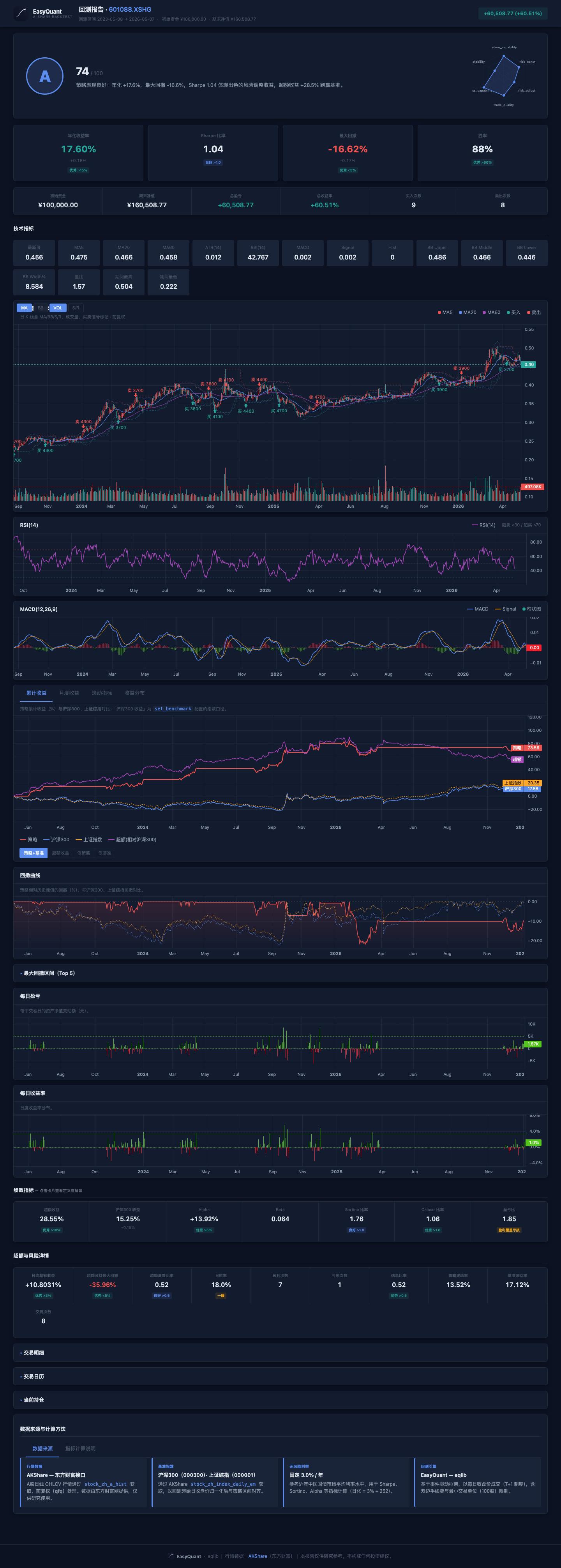
The Bollinger Bands strategy excels in range-bound markets — buy when price touches the lower band, sell at the upper band, a natural buy-low-sell-high logic. Actual backtest results will vary with market conditions.
MACD Trend + Volume Confirmation (Example 16, stock 600536 China Software)
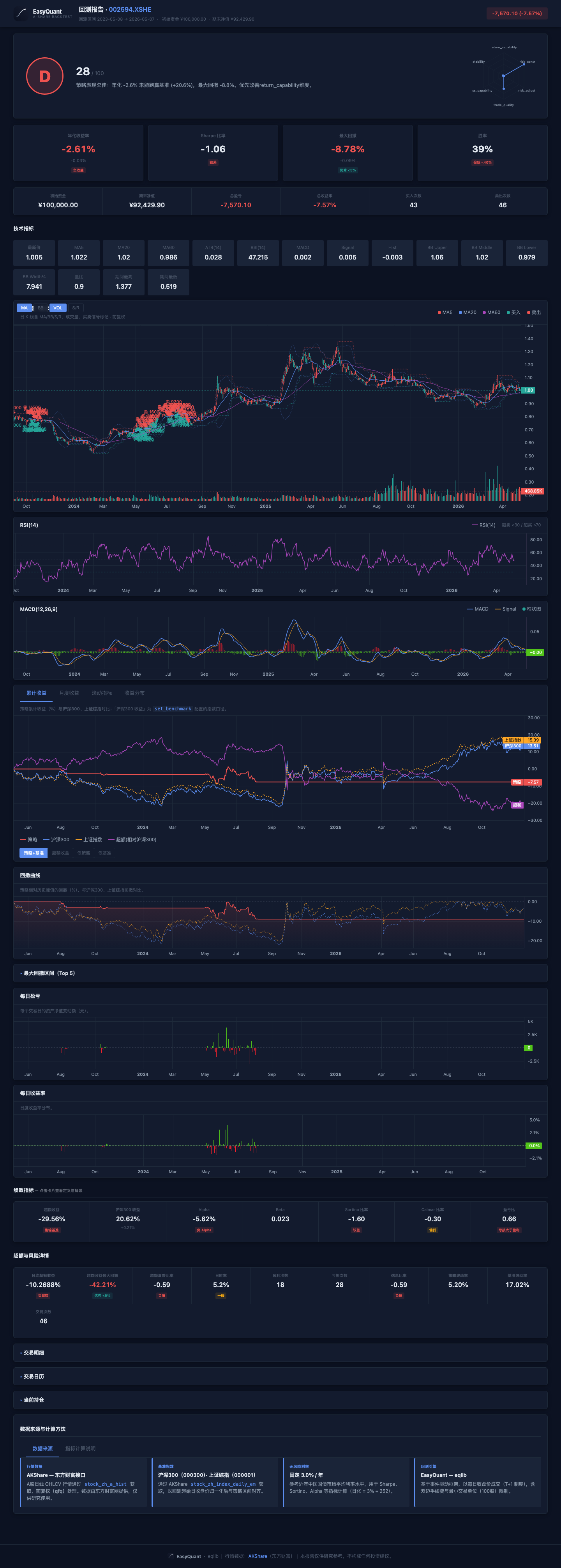
Tech stocks are highly volatile; a MACD golden cross confirmed by rising volume effectively captures trend initiation points. Actual backtest results will vary with market conditions.
Grid Trading (Example 18, stock 601857 PetroChina)
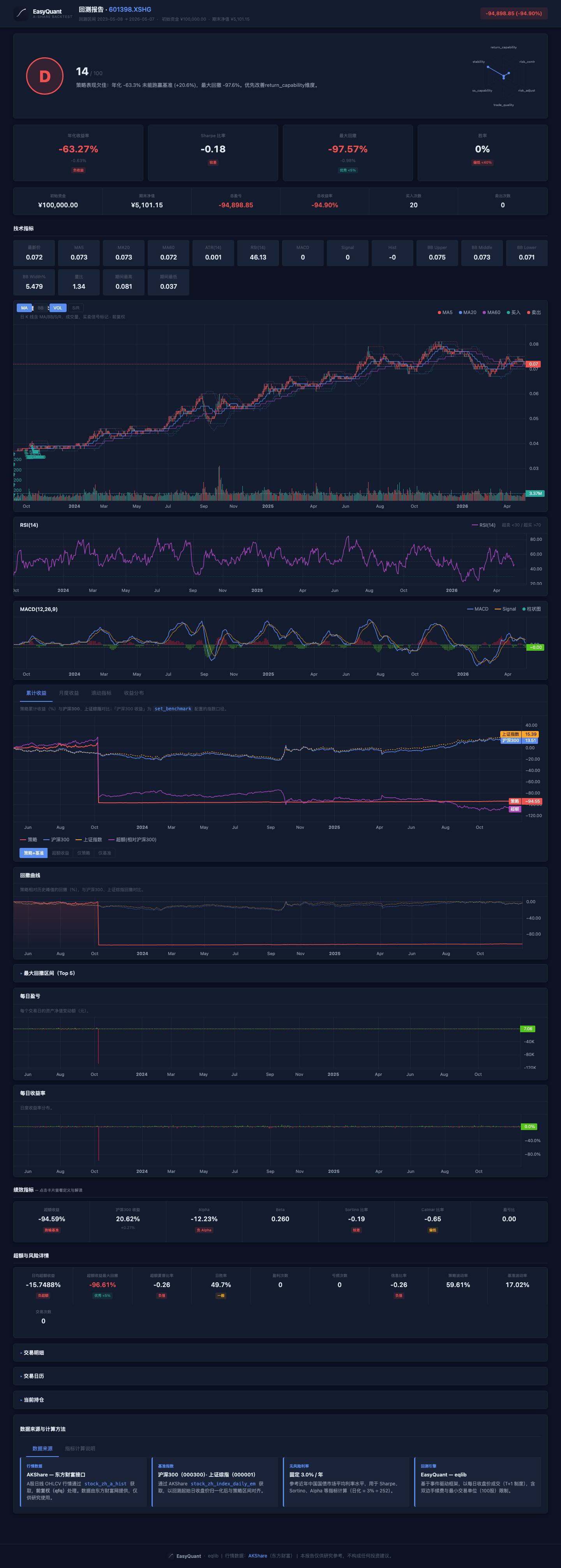
Grid trading suits low-volatility stocks with clear price ranges — repeatedly "buying low and selling high" within the range. Actual backtest results will vary with market conditions.
Multi-Factor Stock Selection (Example 17, 10-stock universe)
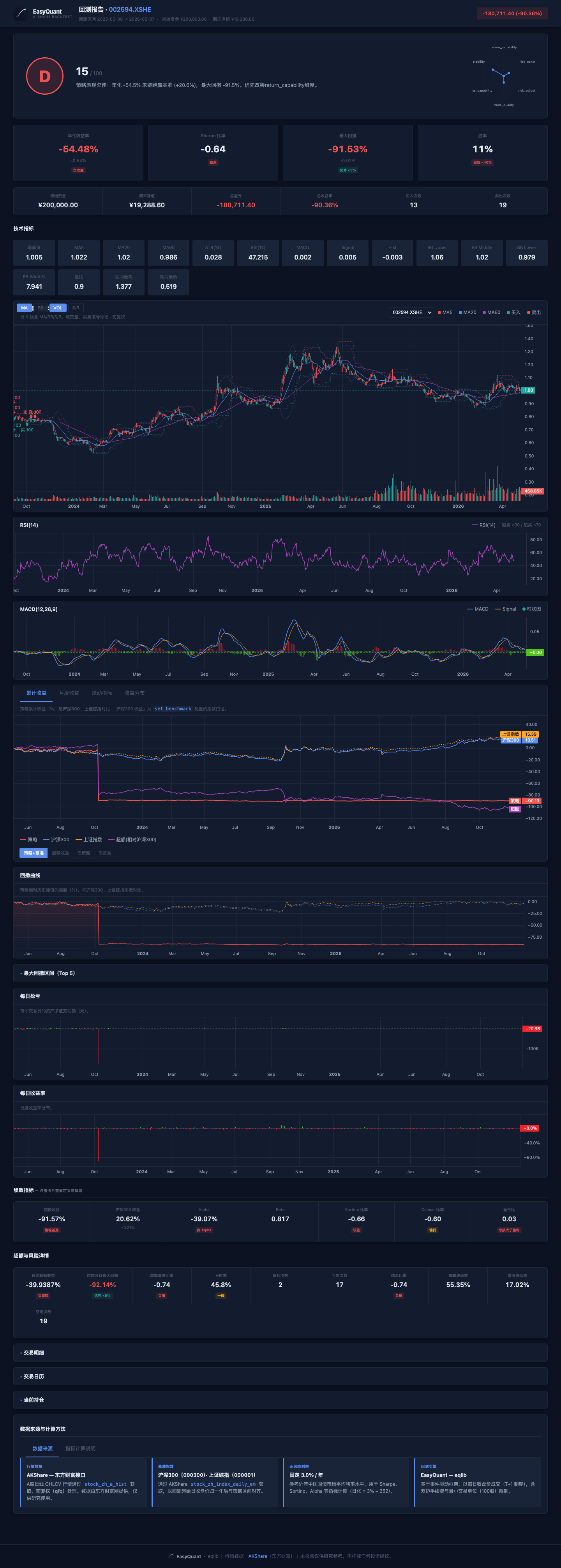
The multi-factor model selects the top 3 stocks each week from a pool of 10 based on composite momentum/volume/volatility scores, with high turnover. Actual backtest results will vary with market conditions.
Stock Selection Strategy Interface (Example 10, 14-stock universe)
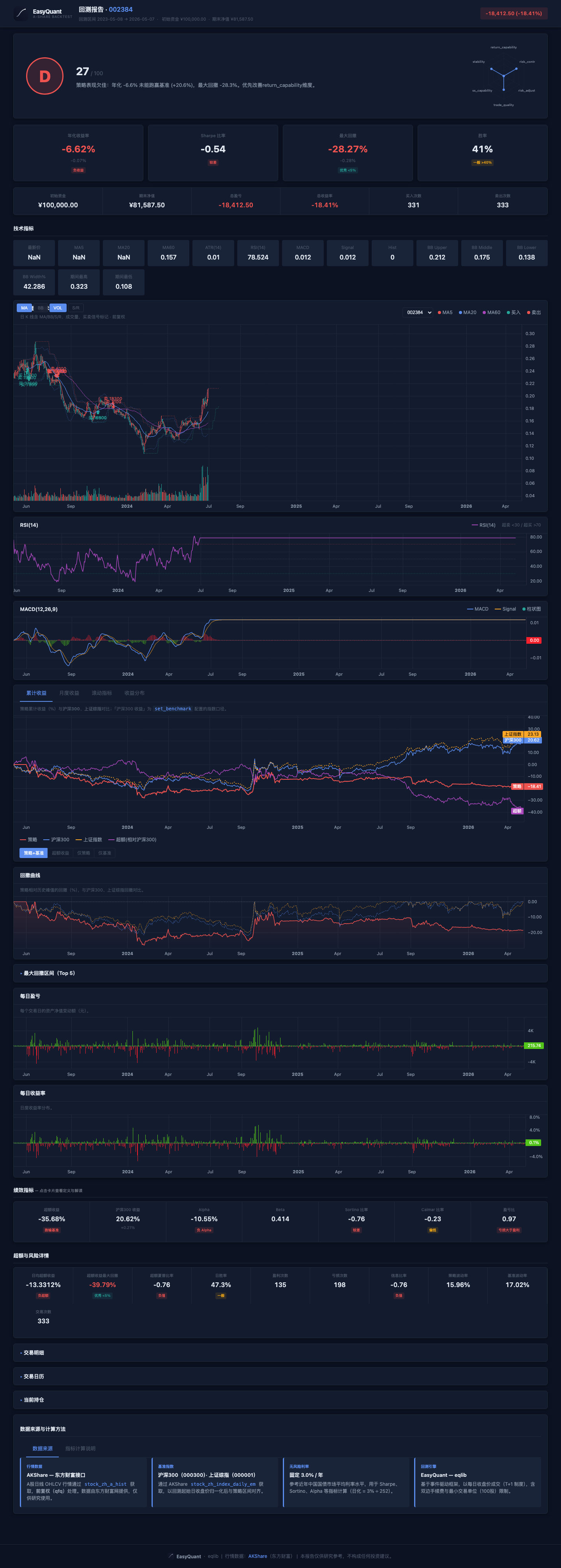
Selection based on low PE valuation + monthly rebalancing, held through the end of the period. Actual backtest results will vary with market conditions.
Portfolio Backtest (Example 11, 5 stocks equal-weight)
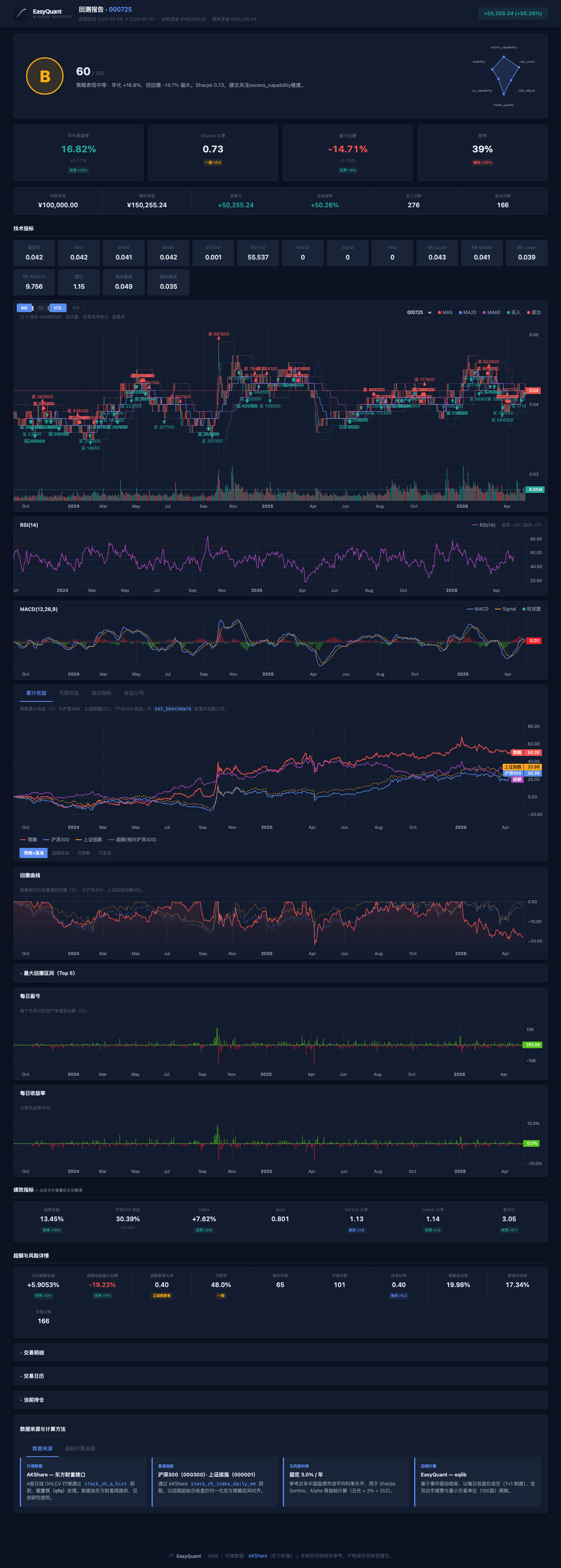
The momentum strategy's performance varies significantly depending on market regime — it may perform well in trending markets but poorly in ranging ones. Actual backtest results will vary with market conditions.
Reading suggestion: Open each corresponding .html file in your browser (see reports/README.md), and observe how the same page structure presents different metric cards, candlestick charts, drawdown curves, and trade tables across strategies.
3. Interpreting the Backtest Report
3.1 Running a Backtest to Generate a Report
from eqlib import *

def initialize(context):
    g.security = '601390'
    set_benchmark('000300.XSHG')
    set_order_cost(OrderCost(
        open_tax=0, close_tax=0.0005,
        open_commission=0.00025, close_commission=0.00025,
        min_commission=5,
    ))
    run_daily(market_open, time='every_bar')

def market_open(context):
    hist = attribute_history(g.security, 25, '1d', ['close'])
    if hist.empty or len(hist) < 20:
        return
    ma5 = hist['close'].tail(5).mean()
    ma20 = hist['close'].mean()
    price = hist['close'].iloc[-1]

    if price > ma5 > ma20:
        if g.security not in context.portfolio.positions:
            order_value(g.security, context.portfolio.available_cash)
            log.info('BUY %s @ %.3f' % (g.security, price))
    elif price < ma5 < ma20:
        if g.security in context.portfolio.positions:
            order_target(g.security, 0)
            log.info('SELL %s @ %.3f' % (g.security, price))

    record(price=price, ma5=ma5, ma20=ma20)

result = run_strategy(
    initialize,
    start_date='2024-01-01',
    end_date='2024-12-31',
    starting_cash=100000,
    benchmark='000300.XSHG',
    securities=['601390'],
)
3.2 Interactive HTML Report
Open reports/backtest_*.html in your browser (no local web server needed). From top to bottom, it typically includes: Summary → Metric Cards (annualized return, Sharpe ratio, max drawdown, Alpha/Beta, etc. — click for tooltips) → Candlestick & Technical Indicators → Cumulative Returns (strategy vs benchmark) → Drawdown → Daily P&L / Daily Returns → Trades, Positions tabs.
The mapping between each field and the analyze_returns dictionary keys is detailed in the Report Format Guide. The repository includes an example export index for cross-referencing real HTML/PNG: reports/README.md.
3.3 Markdown Report
File path: reports/backtest_YYYYMMDD_HHMMSS.md
# Backtest Report: 601390

## Summary
- **Period**: 2024-01-01 to 2024-12-31
- **Initial Capital**: 100,000.00
- **Final Value**: 108,234.56
- **P&L**: +8,234.56 (+8.23%)
- **Buy Orders**: 6
- **Sell Orders**: 5

## Trade Log
| # | Date | Action | Security | Price | Amount | Commission |
|---|------|--------|----------|-------|--------|------------|
| 1 | 2024-01-15 | BUY | 601390 | 4.850 | 20,618 | 29.80 |
| 2 | 2024-03-20 | SELL | 601390 | 5.120 | 20,618 | 31.75 |
| 3 | 2024-04-10 | BUY | 601390 | 5.050 | 20,500 | 29.62 |
...
Key areas to focus on:
- P&L (Profit and Loss):
- Absolute return (+8,234.56) and relative return (+8.23%)
-
Compare with the CSI 300 over the same period: if the CSI 300 gained 15% while your strategy only gained 8%, the strategy underperformed the benchmark
-
Trading frequency:
- 6 buys, 5 sells → 11 total trades
- Too many trades = high turnover = commissions eating into profits
-
Too few trades = signals may not be responsive enough
-
Per-trade P&L:
- Review each buy and sell price trade by trade
-
If most trades are losing, the signal quality is poor
-
Commission costs:
- Check the commission ratio for each trade
- Small trades may have disproportionately high commission costs (due to the 5 CNY minimum)
3.4 JSON Report
File path: reports/backtest_YYYYMMDD_HHMMSS.json
import json

with open('reports/backtest_20260503_143000.json') as f:
    report = json.load(f)

# Basic metrics
print("Total return: %.2f%%" % report['pnl_pct'])
print("Number of trades:", report['num_trades'])

# Daily portfolio value curve
for entry in report['portfolio_values']:
    print(entry['date'], entry['value'])

# Custom recorded values (written via record())
for entry in report['recorded_values']:
    print(entry['date'], entry['price'], entry['ma5'])
The JSON report is suitable for further data analysis, such as: - Calculating maximum consecutive losing days - Analyzing the ratio of days in-position vs out-of-position - Plotting the cumulative return curve
3.5 HTML Interactive Report — Layer-by-Layer Guide
The HTML report is the most critical backtest analysis tool. After opening it in a browser, it is organized from top to bottom in the following layers:
Layer 1: Header Summary
The top of the page displays the backtest target, date range, initial capital, and the final asset P&L amount and percentage. This is where you judge strategy profitability at a glance.
Focus: Is P&L positive? What is the profit relative to initial capital?
Layer 2: Summary Cards
Below the header, a row of small cards shows the most critical strategy metrics:
| Card | Meaning | Good Value |
|---|---|---|
| Annualized Return | Compound annual growth rate | > 10% acceptable, > 20% excellent |
| Excess Return | Strategy return − Benchmark return | Positive = outperformed the market |
| Sharpe Ratio | Excess return per unit of risk | > 1 good, > 2 excellent |
| Max Drawdown | Largest peak-to-trough decline | < 15% good, < 20% acceptable |
| Win Rate (Trade) | Percentage of profitable round-trip trades | > 50% good |
| Calmar Ratio | Annualized return / |max drawdown| | > 1 good |
Focus: Don't just look at returns! The Sharpe ratio and max drawdown tell you "how much risk was taken to earn this return."
Layer 3: Detailed Metric Row
Below the summary cards, a more detailed metric row includes:
| Metric | Meaning | How to Read |
|---|---|---|
| Annualized Volatility | Standard deviation of returns (annualized) | Lower = more stable |
| Sortino Ratio | Risk-adjusted return considering only downside risk | More conservative than Sharpe |
| Alpha | Excess return unexplained by the market | Positive = genuine alpha |
| Beta | Sensitivity to the broad market | 1 = in sync, >1 = more aggressive |
| Information Ratio | Active return / tracking error | > 0.5 good |
| Daily Win Rate | Percentage of profitable trading days | Note: different meaning from trade win rate |
| Profit/Loss Ratio | Average profit / average loss | > 1.5 good |
Focus: Positive Alpha + Beta near 1 means the strategy truly generates excess return, not just leveraging up or betting on direction.
Layer 4: Candlestick & Technical Indicator Chart
The strategy's price chart typically includes: - Main chart: Price line + moving averages (MA5/MA20) + buy/sell markers - Volume: Bar chart below - Green shading: Periods when a position was held
How to read: 1. Are buy/sell points reasonable? (buys at lows, sells at highs) 2. Did the price rise during holding periods? 3. Is trading frequency reasonable? (too dense may indicate overtrading)
Layer 5: Cumulative Returns
Strategy cumulative return curve vs benchmark index curve. Key comparison: Is the strategy line above the benchmark line?
- Strategy line consistently above benchmark → Strategy steadily outperforms
- Strategy line drops significantly below benchmark during some period → Strategy failed during that period
- Both lines nearly parallel → Strategy merely tracked the market, no alpha
Layer 6: Drawdown Curve
Shows the depth of the portfolio's decline from its historical high. Focus on the deepest point: Could you have tolerated that period?
Layer 7: Daily P&L / Returns
Bar chart showing daily profit/loss. Look for: - Consecutive losing days - Whether losing-day bars are longer than winning-day bars (single losses too large) - Whether returns are concentrated in just a few days
Layer 8: Tabs (Trades, Positions, etc.)
- Trades Tab: Time, price, quantity, and commission for each trade. Review trade by trade for reasonableness.
- Positions Tab: Position state at the end of the backtest.
- Attribution Tab: Brinson attribution (allocation effect, selection effect, interaction effect).
Recommended reading flow: 1. Header → Did it make money? 2. Metric cards → Sharpe > 1? Drawdown < 20%? 3. Cumulative return chart → Did it beat the benchmark? 4. Drawdown curve → Can you accept the worst case? 5. Trade table → Is each trade reasonable? 6. Attribution → Did returns come from allocation or selection?
4. Interpreting Charts
4.1 Chart Structure
  |                                                     |  Portfolio Value
P |  ---MA5                                              |
r |  ---MA20                                             |
i |  ---Close                                            |
c |                                                      |
e |     [SELL]    [BUY]                                  |
  |    o          o     o[SELL]                          |
  |   / \  ===== / \___/   \                             |
  |  /   \      /           \                            |
  | /     \====/             \=====                      |
  +------------------------------------------------------|-> Date
4.2 Chart Elements
| Element | Meaning |
|---|---|
| Gray line | Daily closing price of the stock |
| Blue line | 5-day moving average (short-term trend) |
| Orange line | 20-day moving average (medium-term trend) |
| Green circle | Buy point (annotated below price) |
| Red circle | Sell point (annotated above price) |
| Green shading | Periods when a position was held |
| Green line (right axis) | Total portfolio asset value |
4.3 How to Read the Chart
Good signals: - BUY points are typically at price lows (near a golden cross of moving averages) - SELL points are typically at price highs (near a death cross of moving averages) - The equity curve (right axis) trends upward overall - Price shows a clear rise during holding periods (green shading)
Bad signals: - BUY and SELL alternate frequently → Repeatedly "whipsawed" in a range-bound market - Equity curve trends steadily downward → Strategy is losing money - No significant price change during holding periods → Ineffective signals
5. Risk and Attribution Analysis
5.1 Comprehensive Risk Metrics
from eqlib import analyze_returns

metrics = analyze_returns(result, risk_free_rate=0.03)

print("Annualized return:    %.2f%%" % (metrics['annual_return'] * 100))
print("Annualized volatility: %.2f%%" % (metrics['annual_volatility'] * 100))
print("Sharpe ratio:          %.2f" % metrics['sharpe_ratio'])
print("Sortino ratio:         %.2f" % metrics['sortino_ratio'])
print("Max drawdown:          %.2f%%" % (metrics['max_drawdown'] * 100))
print("Calmar ratio:          %.2f" % metrics['calmar_ratio'])
print("Alpha:                 %.4f" % metrics['alpha'])
print("Beta:                  %.3f" % metrics['beta'])
print("Daily win rate:        %.2f%%" % (metrics['win_rate'] * 100))
5.2 Brinson Attribution (Multi-Stock Portfolios)
Decomposes returns into three sources:
from eqlib import brinson_attribution

attr = brinson_attribution(result)

print("Allocation effect: %.4f  <-- Returns from asset allocation (sector/industry selection)" % attr['allocation_effect'])
print("Selection effect:  %.4f  <-- Returns from individual stock selection" % attr['selection_effect'])
print("Interaction effect: %.4f  <-- Combined effect of allocation and selection" % attr['interaction_effect'])
- Allocation effect > 0: Your sector/industry choices were correct
- Selection effect > 0: Your stock picks within each sector were correct
- Interaction effect: Usually a small adjustment term
5.3 Simplified Factor Analysis
from eqlib import simple_factor_analysis

ff = simple_factor_analysis(result)

print("Market Beta:           %.3f  <-- Market sensitivity" % ff['market_beta'])
print("Annualized Alpha:      %.4f  <-- Excess return unexplained by market" % ff['alpha_annual'])
print("Momentum correlation:  %.3f" % ff['momentum_correlation'])
print("Residual volatility:   %.3f" % ff['residual_volatility'])
Note:
fama_french_analysishas been deprecated; usesimple_factor_analysisinstead.
6. Determining Whether a Strategy Is Effective
6.1 Core Evaluation Criteria
| Question | Criterion |
|---|---|
| Does the strategy make money? | Total return > 0 |
| Does it beat the market? | Strategy return > Benchmark return (CSI 300) |
| Is risk-adjusted performance good? | Sharpe ratio > 1 |
| Is the max drawdown acceptable? | Max drawdown < your risk tolerance |
| Is trading frequency reasonable? | Not daily turnover, nor once every six months |
6.2 Comprehensive Evaluation Template
metrics = analyze_returns(result, risk_free_rate=0.03)

checks = []
checks.append(("Return > 0", metrics['total_return'] > 0))
checks.append(("Beat benchmark", metrics['alpha'] > 0))
checks.append(("Sharpe > 1", metrics['sharpe_ratio'] > 1))
checks.append(("Drawdown < 20%", abs(metrics['max_drawdown']) < 0.20))
checks.append(("Win rate > 50%", metrics['win_rate'] > 0.50))

print("--- Strategy Evaluation ---")
passed = 0
for name, ok in checks:
    status = "PASS" if ok else "FAIL"
    if ok:
        passed += 1
    print("  [%s] %s" % (status, name))
print("Passed %d/%d checks" % (passed, len(checks)))
6.3 Out-of-Sample Validation
# Training set: 2020-2023, used for parameter tuning
result_train = run_strategy(
    initialize, '2020-01-01', '2023-12-31',
    starting_cash=100000, securities=['601390'],
)

# Test set: 2024, used for validation
result_test = run_strategy(
    initialize, '2024-01-01', '2024-12-31',
    starting_cash=100000, securities=['601390'],
)

# If training Sharpe = 2.0, test Sharpe = 0.3 -> overfitting
# If training Sharpe = 1.5, test Sharpe = 1.2 -> parameters are stable
7. Common Backtesting Pitfalls
7.1 Overfitting
Backtest annualized 50%, live annualized 5%
Cause: Parameters were repeatedly tweaked on historical data, effectively "memorizing" past price movements
How to identify: Results change drastically with minor parameter tweaks → overfitting
7.2 Look-Ahead Bias
# Wrong example: using today's closing price for an open-market decision
# attribute_history returns yesterday's data — this is correct
# But if the strategy uses get_today_close() or any method that includes today's data,
# that constitutes look-ahead bias
7.3 Survivorship Bias
Only tested stocks that are still listed → Ignored delisted / ST (Special Treatment) stocks
→ Backtest results are artificially inflated
7.4 Ignoring Liquidity
Backtest buys 1M CNY of a stock, but the stock's average daily volume is only 500K
→ Impossible to fill in reality, backtest results are invalid
7.5 Backtest Period Too Short
Only backtested 3 months → May have coincided with a bull/bear market
→ Recommend at least 1-2 years, covering different market environments
8. Portfolio Backtesting
8.1 Single Stock vs Portfolio
| Single-Stock Backtest | Portfolio Backtest | |
|---|---|---|
| Use case | Validate a single strategy logic | Multi-stock rotation, asset allocation |
| API | run_strategy / run_backtest |
run_portfolio_backtest |
| Stock universe | One stock | Multiple stocks |
| Position sizing | context.portfolio.available_cash |
position_pct or position_amount |
8.2 Portfolio Backtest Example
from eqlib import StrategyConfig, run_portfolio_backtest

# Define configuration
config = StrategyConfig(
    starting_cash=200000,
    securities=['601390', '600519', '000858'],
    benchmark='000300.XSHG',
    position_pct=0.33,       # Each stock uses at most 33% of available cash
    start_date='2024-01-01',
    end_date='2024-12-31',
    report_suffix='multi_stock_v1',
)

# Strategy function
def my_strategy(context):
    for sec in context.universe:
        hist = attribute_history(sec, 25, '1d', ['close'])
        if hist.empty:
            continue
        ma20 = hist['close'].tail(20).mean()
        price = hist['close'].iloc[-1]

        if price > ma20 * 1.02:
            order_value(sec, context.portfolio.available_cash * 0.33)
        elif price < ma20 * 0.98 and context.portfolio.positions.get(sec):
            order_target(sec, 0)

# Run the backtest
result = run_portfolio_backtest(config, my_strategy)
8.3 Portfolio Backtest Output
==================================================
Portfolio Backtest: 2024-01-01 → 2024-12-31
Universe: ['601390', '600519', '000858']
==================================================
Starting Cash:         200,000.00
Final Value:           215,342.00
P&L:                 +15,342.00 (+7.67%)
Total Trades:              12

--- Per-Stock Summary ---
  600519: 3 buys, 3 sells, net shares 0, realized ¥5,200.00
  601390: 4 buys, 4 sells, net shares 0, realized ¥3,100.00
  000858: 5 buys, 5 sells, net shares 0, realized ¥7,042.00
9. Next Steps
After learning to interpret backtest results, here's what's next:
- Tutorial 03: Strategy Optimization & Improvement — Parameter tuning, portfolio optimization, attribution analysis, avoiding overfitting
- Tutorial 05: RSI Mean Reversion Strategy — Switch to a different strategy approach: mean reversion
- Example 20: Support/Resistance Portfolio Strategy — A complete multi-stock portfolio strategy case study with pre-generated backtest reports for direct review
- Tutorial 04: Paper Trading to Live Trading — From paper trading to PTrade/QMT live deployment